Wide World of Women
http://www.wideworldofwomen.net/Forum/

Monitor Issue
http://www.wideworldofwomen.net/Forum/viewtopic.php?f=18&t=156646
Page 1 of 1

Author:  DenisMa [ Sat Mar 24, 2012 2:38 pm ]
Post subject:  Monitor Issue

I have a problem. I've had it since I played a video game yesterday. Well, since after I played the game. I have an Acer monitor. It seems to work fine. However, since last night there is a problem with the size of icons on my desktop and words and icons on websites as well. On the monitor itself, there is a setting button and one of the things it notes is "Wide mode". I had it on "Full" but since I played the game and went back to my desktop, the icons and everything on "full" are much too big. I have the icon size at "smaller" which I found in the control panel. Can't get it smaller. But in the "wide mode" place, I click on "Aspect" and everything is back to the size that I like. Things don't look a bit blurry either. Only problem is that under "aspect" the screen is "letterboxed". :Bang

Author:  joeycap666 [ Sat Mar 24, 2012 3:35 pm ]
Post subject:  Re: Monitor Issue

DenisMa wrote:
I have a problem. I've had it since I played a video game yesterday. Well, since after I played the game. I have an Acer monitor. It seems to work fine. However, since last night there is a problem with the size of icons on my desktop and words and icons on websites as well. On the monitor itself, there is a setting button and one of the things it notes is "Wide mode". I had it on "Full" but since I played the game and went back to my desktop, the icons and everything on "full" are much too big. I have the icon size at "smaller" which I found in the control panel. Can't get it smaller. But in the "wide mode" place, I click on "Aspect" and everything is back to the size that I like. Things don't look a bit blurry either. Only problem is that under "aspect" the screen is "letterboxed". :Bang


Leave it on full but instead of changing the font size go back into your control panel and trying changing the resolution. It should say something like,"Adjust screen resolution". See if that works. :Kool

Author:  DenisMa [ Sat Mar 24, 2012 3:41 pm ]
Post subject:  Re: Monitor Issue

That didn't change. I have it on 1268 x 1024. Anyway, the list of screen resolutions that I have changes. Sometimes it shows something like 2047 x whatever and then other times it shows 1400 x whatever. None of which works. I just have the two lowest options working along with 1268. When I click on apply, it says input not supported. Seems odd since they offer it to me.

Author:  joeycap666 [ Sat Mar 24, 2012 5:55 pm ]
Post subject:  Re: Monitor Issue

DenisMa wrote:
That didn't change. I have it on 1268 x 1024. Anyway, the list of screen resolutions that I have changes. Sometimes it shows something like 2047 x whatever and then other times it shows 1400 x whatever. None of which works. I just have the two lowest options working along with 1268. When I click on apply, it says input not supported. Seems odd since they offer it to me.

Hmm, not sure what else to try. :?

Author:  DenisMa [ Sat Mar 24, 2012 10:53 pm ]
Post subject:  Re: Monitor Issue

This is what it looks like at 95% with the full mode on:


Image

Looks a little funny to me. Can't explain it. Maybe things are a bit stretched. And here it is on the Aspect:

Image

Looks better to me. A tad small at 95%. I normally have it at 100. Also I have something called an OSD timeout. I normally have that at 10. Whatever that means. I changed it to 120. No changes as far as I can tell.

Author:  DenisMa [ Sun Mar 25, 2012 1:49 pm ]
Post subject:  Re: Monitor Issue

Here it is now:


Image


It's like stretched. Hurts one's eyes too. It's really bad when looking at a photo. The picture is almost leaning backwards a bit.

Author:  DenisMa [ Sun Mar 25, 2012 5:26 pm ]
Post subject:  Re: Monitor Issue

This guy had the same problem. He explained it better that I could. The only thing is that I didn't change the resolution. The game is played at a different one so it kept that up after I had turned it off. The resolution in questions was 1280 x 720. Anyway, now my eyes are starting to hurt from this stuff:

"So here's the deal, I currently have an Acer X243H monitor. Its native resolution is 1920x1080, and when I am outputting at that resolution everything is fine :)

The problem arises when I set Windows to output at lower resolutions, for example 1600x900 and 1280x720.
Instead of the full image being stretched across the monitor, it simply stretches the width but leaves the height untouched. On the OSD settings there is a "wide mode" which has the available options "Full" and "Aspect". This problem happens when it is set to "Full." When it is set to "Aspect", it simply displays the resolution in the correct amount of pixels, meaning enormous borders around the display (especially on resolutions as small as 1280x720)."

Author:  joeycap666 [ Sun Mar 25, 2012 11:18 pm ]
Post subject:  Re: Monitor Issue

DenisMa wrote:
Also I have something called an OSD timeout. I normally have that at 10. Whatever that means. I changed it to 120. No changes as far as I can tell.


That OSD timeout is no big deal. That just means if you haven't touched your PC for 1o minutes and it has been idle an on screen display will popup on the screen with the monitor settings. Yeah, I would leave that at 120 or turn it off if possible because those get annoying every time you leave your PC idle for a while.

As far as the other stuff, yeah I think you need to get windows to accept your 1920x1080 resolution that is why I mentioned doing it in the control panel because sometimes when you play video games they automatically kick it down to a lower res so the game plays at normal speed some of those games can't handle the higher res.

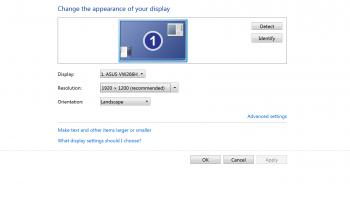
Somehow you need to get it set back to 1920x1080 in the control panel it should be giving you that resolution as an option. I am not sure why it wasn't letting you do it. Do you have the acer set as your primary monitor? Sometimes if you have it set as a secondary monitor it won't let you tweak it to the full res because windows still thinks you have a lesser res monitor as your primary one.

Here is a screen shot of my control panel. My monitor is an asus, yours should say acer in that one box and my res option is set to 1920x1200 but yours should be giving you that 1920x1080 res option. And up top you should just have that large #1, if you have #1 and #2 that means your pc thinks you have 2 monitors going and you need to make the acer the #1 primary one. If you upgraded to an acer from a previous monitor windows might still think you have the lower res previous monitor and will be showing 2 of them.

Image

Page 1 of 1 All times are UTC - 5 hours [ DST ]
Powered by phpBB © 2000, 2002, 2005, 2007 phpBB Group
http://www.phpbb.com/